I expected to have to wait 12 more years to write this post.
Back in 2017, Eric Lengyel published the landmark paper, “GPU-Centered Font Rendering Directly from Glyph Outlines” in the Journal of Computer Graphics Techniques. This paper introduced the Slug algorithm, a way of efficiently rasterizing text on the GPU without first rasterizing to a texture or atlas. Other approaches to direct GPU rendering of glyphs had been tried, but they universally had issues with numerical precision and/or visual fidelity.
The good news: the Slug algorithm has been donated to the public domain ahead of its expiration, and it is now possible to render high-fidelity text directly from outlines on the GPU. See here for the announcement blog post, which also contains some new technical details not previously known publicly.
You can find the sample code for this post on Github here.
Slug, Briefly
The Slug algorithm incorporates several innovations that unlocked pixel-perfect, performant text rasterization under arbitrary projective transformations on the GPU. This article won’t cover any of them in depth; Lengyel’s own presentations and articles (linked throughout) are a far better resource. Instead, what I will present here is a simple demonstration of the Slug algorithm that leverages Apple platform technologies—Core Text and Metal—to demonstrate how to draw beautiful text in real time, in a way that can easily adapt to both 2D and 3D cases. It’s worth it, though, to at least describe the major problems that Slug seeks to solve, so I’ll do my best to provide a gentle overview here.
Inside–Outside
The problem we’re solving is easy enough to state: given a string of text in a certain font, draw that string of text to the screen. This involves, for each pixel, determining if (and how much) that pixel is inside the glyphs (visible elements) of the string. While that sounds simple enough, it presents numerous challenges.
Most fonts use a sequence of Beziér splines to describe the outline of each glyph. Specifically, TrueType fonts use splines composed of quadratic (2nd order) Bézier curve segments, while PostScript Type 1 and OpenType fonts can use cubic (3rd order) segments. To keep the discussion simple, I’ll only talk about quadratic Beziérs here.
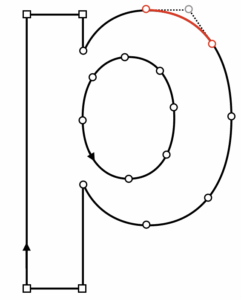
Determining whether a point is inside or outside a compound curve is not such a simple matter. We might imagine casting a ray from each point toward the exterior of the glyph and seeing which curves we intersect. But we might find an arbitrary number of intersections, and we can’t tell just from the intersection point whether we’re “entering” or “exiting” the overall shape. And what do we do if our ray is collinear with a spline segment? What if our ray intersects the endpoints of two connected spline segments?
What we need is a robust winding number. If we associate a direction with each closed spline in the glyph—say, counterclockwise is positive—then each intersection can be given a value of +1 or -1: +1 if crossing while the curve is turning left (locally); -1 if the curve is turning right. Accumulating these values as we find intersections will give us an integer we can interpret to determine our inside-outsideness. The convention we use is called the nonzero rule: if the winding number of a point is non-zero, it is inside the curve.
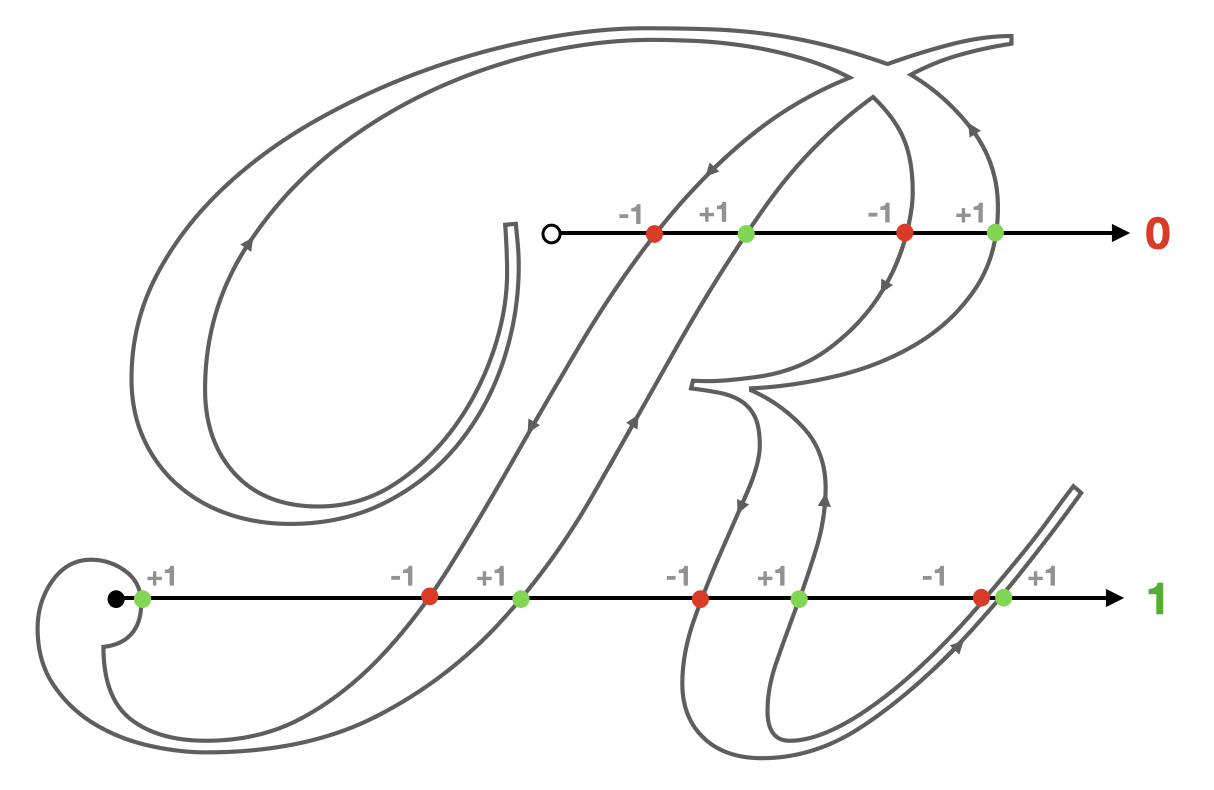
If we could easily and robustly determine inside-outsideness for a given glyph of arbitrary complexity, we’d be well on our way. However, since we are programming computers, using floating-point numbers with finite precision, the story isn’t so rosy. Approaching this problem naively results in partial solutions that will shimmer and crack, especially when animated.
One core innovation of the Slug algorithm is a novel method of root classification for quadratic equations. The details of the approach are well-described in this 2018 presentation, so I won’t go into details here.
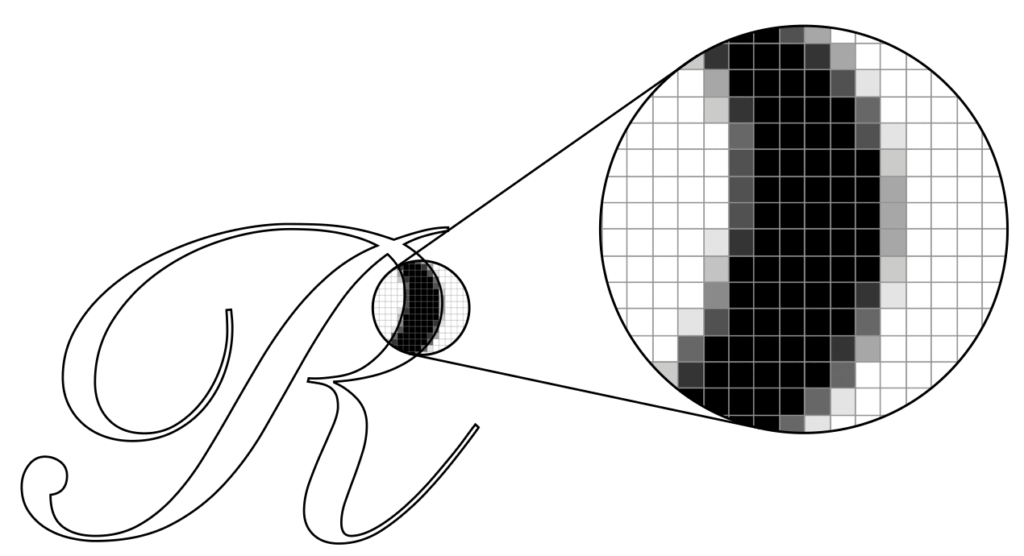
It’s worth noting that even if we have numerically robust solutions for finding inside-outsideness, that’s not quite enough to render smooth text. If the decision at the pixel level is binary (in/out, black/white), then glyphs will appear jagged or pixellated.
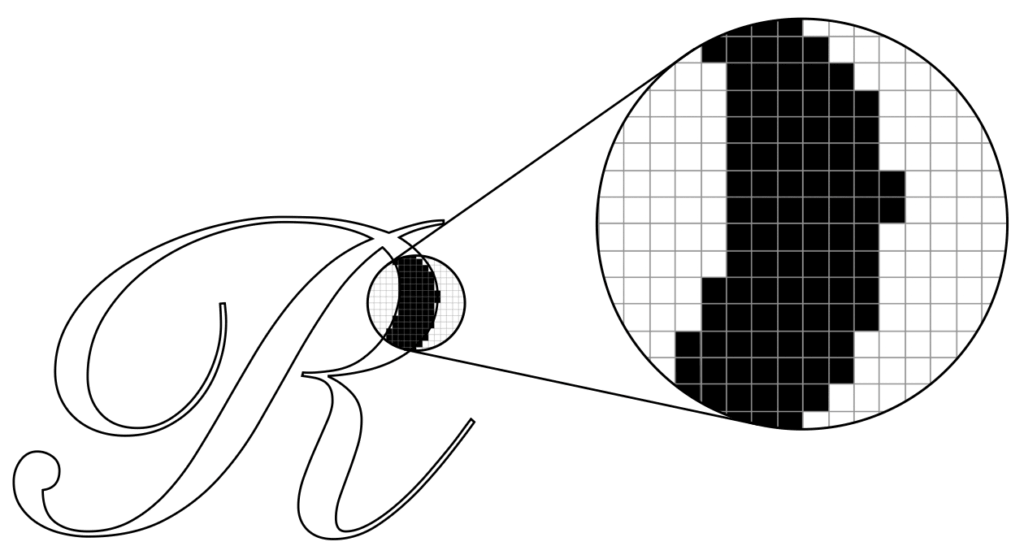
Instead, what we really want is a fractional coverage value that tells us how much of the pixel is covered by the glyph. The presentation mentioned above goes into the minutiae of this calculation as well, and it is implemented in the Slug reference implementation and the sample code that accompanies this post.
To address pathological cases like totally horizontal and totally vertical segments, Slug actually determines visibility by casting rays in the horizontal and vertical directions and combining the coverage results
Accelerating with Bands
Any given glyph might contain any number of curve segments, which means that—in a brute-force algorithm—any given sample might need to do an arbitrary amount of work. On the other hand, most curves do not influence the winding number of most points, so Slug applies an optimization to reduce the number of curve segments that need to be considered by each sample.
As a preprocessing step, curve segments are allocated to one or more “bands;” slices of the glyph that subdivide it into a handful of rectangular regions.
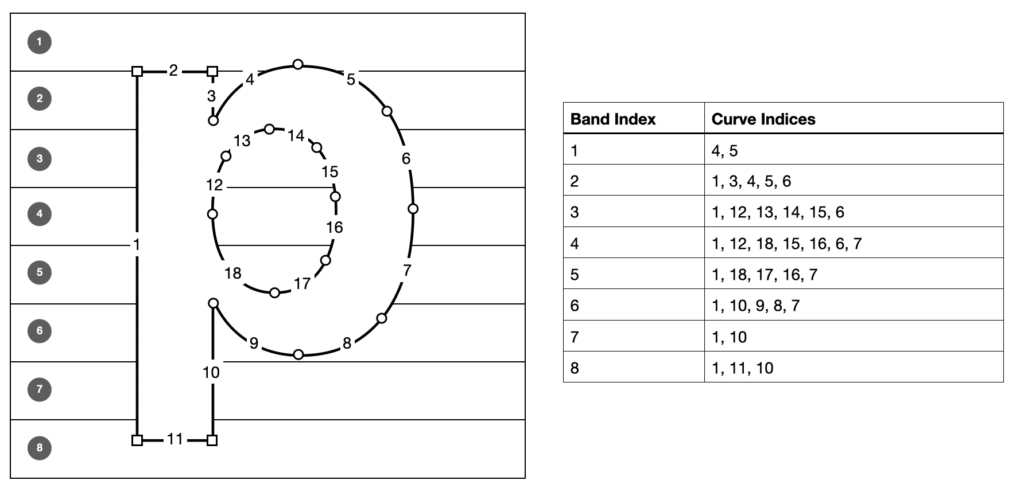
For the purposes of determining winding number, it is trivially true that any curve that does not intersect the bounding box of a band cannot be intersected by a ray cast from within that band. Since Slug casts rays in both the horizontal and vertical directions, we need to allocate curves to both horizontal and vertical bands. A curve might intersect several bands, but on average it will intersect a small number relative to the total number of bands, reducing the calculation required for each sample.
The inner loop of the Slug algorithm proceeds in three steps: first, it determines which horizontal band contains the sample and determines the partial coverage along the X dimension; then it determines the vertical band containing the sample and determines its coverage; finally it combines the coverage results into a total coverage value and produces a coverage value which can be multiplied by the glyph’s color to determine the fragment’s color, which can be blended into the framebuffer.
Dynamic Dilation
When a glyph is drawn at a small size, it is possible for certain narrow features to disappear due to undersampling (as can happen when a texture is minified without mipmapping). This is mitigated by dynamic dilation, an extension added to Slug in 2019. This technique uses the model-view-projection transform to push out the borders of glyph bounding rectangles in a precise manner so as to ensure that any pixels potentially covering a glyph get rasterized, heightening fidelity at small text sizes.
I didn’t notice dilation making much of a difference in my implementation; it’s possible I messed up the math along the way. In any event, all of the mathy details are in the patent announcement post, so check them out there.
The Sample Code
You can find the sample code for this post on Github here.
The sample app is a demonstration of Slug on macOS that rasterizes phrases in numerous scripts, with an emphasis on rendering fidelity at any zoom level and under any projective transformation.
Since the shader code is essentially a mechanical translation of the reference shaders with arguably no transformation, I am making the entire project available under the Apache License 2.0, with credit to Eric for the shader code, which I believe to be permissible under the license of the reference code.
Text Mesh API
The sample app separates the Slug implementation from the demo app implementation with a thin Objective-C API, listed below.
// Text rendering context management
TextRendererRef TextRendererCreate(const TextRendererDescriptor *desc);
void TextRendererDestroy(TextRendererRef context);

// Text mesh API
TextMeshRef TextMeshCreate(TextRendererRef context, const char *string, const char *fontName, CGSize maximumSize);
TextMeshRef TextMeshCreateFromAttributedString(TextRendererRef context, CFAttributedStringRef str, CGSize maximumSize);
CGRect TextMeshGetBounds(TextMeshRef mesh);
void TextMeshRender(TextMeshRef mesh, const TextViewConstants *view, id<MTLRenderCommandEncoder> renderEncoder);
void TextMeshDestroy(TextMeshRef mesh);
The preferred way to create a text mesh is from a CFAttributedStringRef (or an NSAttributedString, which can be toll-free bridged). This API allows you to assign different attributes (color, font, etc.) to ranges of glyphs, which is used in the demo to apply a rainbow effect to one of the sample strings.
Implementation
Internally, the text rendering context maintains a list of font atlases, one per typeface used by a text mesh. A font atlas stores two textures: a band texture which stores the curves associated with each (horizontal and vertical) band, and a curve texture, which stores the actual Beziér curve control points. For each glyph used in a text mesh, the font atlas stores various typographic metrics and indices that allow the shader to determine which curves belong to the glyph.
Core Text is used to perform text layout and shaping. Core Text is an enormously powerful framework for text handling, analogous to Harfbuzz and Uniscribe/DirectWrite on other platforms. Text shaping is a deep field, and you should almost always delegate it to a mature, robust library that understands typographic complexities like ligatures, bidi text, cursive scripts, combining characters, hinting, etc.
Compared to the text mesh creation and layout code, the shader code is relatively straightforward, at only ~200 lines of MSL.
Enhancements
The sample implementation is not maximally robust or performant, and I wouldn’t recommend using it in production. Although it supports any script that can be handled by Core Text, it is not fully-featured. For instance, it doesn’t support Emoji at all.
Each text run (portion of text with uniform styling) is drawn with a separate draw call, and resources are sometimes bound redundantly. A robust implementation should coalesce runs that reference the same resources to cut down on the number of draw calls. Font atlases could probably be consolidated into a single texture or texture array; they are currently allocated separately.
Conclusion
In my opinion, Slug is the final word on GPU-based text rasterization. It brings an unprecedented level of precision and performance, and I’m personally grateful that is now in the public domain ahead of schedule. I hope this brief overview and the accompanying sample help you appreciate its beauty and aid your implementation if you choose to incorporate it in your own projects.